
Details pane
Why a torrent is not moving, said in words with a remedy, above its pieces, its speed and its facts. Then Files, Peers, Trackers, Log and Speed.
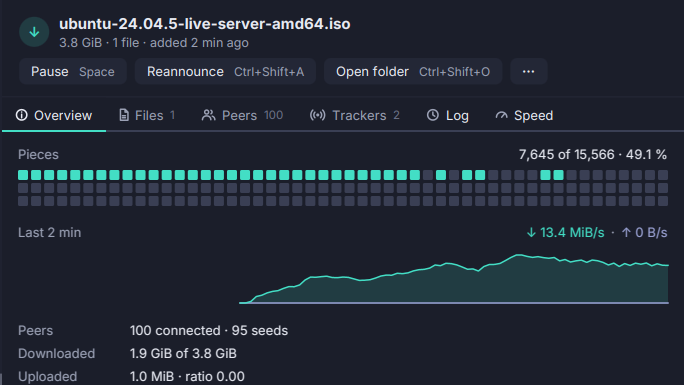
The details pane shows the selected torrent, under the list or beside it on the right, and opens on its Overview.
- A diagnosis. When a torrent is not moving, a card says why, in order: an error, queued, no peers, pieces nobody in the swarm has, peers choking you, or simply quiet. When the missing pieces all fall in one file you wanted, the card offers to skip that file.
- The pieces, as a strip: what you have, what is missing, and in amber what no connected peer has a copy of.
- The speed of the last minutes, as a sparkline that grows with the history the selection has.
- The facts: peers and seeds, downloaded and uploaded, ratio, save path, both info-hashes, piece size, availability, wasted bytes, times, next announce, tracker.
The other tabs: Files (priorities, open, a glyph by kind), Peers (with Ban Peer and Copy Address), Trackers (add, remove, reannounce), Log (the event log for this torrent alone) and Speed (its own graph). The header’s buttons are the window’s commands, so they show the same chords.
Ctrl+Shift+D shows or hides the pane; View → Details Pane on the Right moves it, and each place keeps its own size.