
Torrenta
Every torrent, one keystroke away
A BitTorrent client for people who keep their hands on the keyboard. All 56 commands are a chord or an Alt+X search away, on libtorrent, the engine inside qBittorrent. Search, RSS rules and torrent creation built in. No account, no ads, no telemetry.
The command palette over the transfer list. Every action is searchable, and every one has a key.
A look at the window
The real thing: the sidebar's status, category, tag and tracker filters, two-line rows with progress and peers, the omnibox above them, and the details pane explaining the selected download, its pieces, its speed and its facts. The status bar keeps the port, the DHT, the rates and the free space in view.

Why Torrenta
As complete as qBittorrent and Transmission, with the keyboard first and nothing in the way. Free, open source, and the same on macOS, Windows and Linux.
Keyboard-first
Every action has a chord and a palette entry and applies to the whole
selection. The omnibox filters with state:seeding,
size>4g or added<7d, runs a command after
>, and adds a magnet you paste into it.
Nothing missing
Categories and tags, queue and share limits, scheduled speed limits, an IP filter, watch folders, run-on-event, RSS rules, search and torrent creation: what you would install qBittorrent for, in one window.
Yours, quietly
No account, no ads, no telemetry. Beyond the swarm and the servers and feeds you add, the one request it makes is a daily look at GitHub for a newer release, which one setting turns off. Settings are a plain file you can read, edit and sync.
One window, two engines
Torrenta runs libtorrent 2 in
process, with v2 and hybrid torrents, uTP, DHT, PEX and encryption. Or it
drives a transmission-daemon on a seedbox or a NAS over its
RPC, from the same window: what the daemon cannot do is hidden, never
greyed out or faked. Read how.
Download Torrenta Free and open source, for macOS, Windows and Linux. See how it compares.
What's new
The highlights of 0.1.0. See the changelog for everything.
- The first release : Torrenta 0.1.0 is out for Linux (x64), macOS (Apple Silicon) and Windows (x64): installers with their own Java runtime, nothing else to install.
- Search built in : Prowlarr or Jackett over Torznab, or a definition file per site; every provider asked at once, results as they arrive, the same torrent shown once.
- RSS with auto-download rules : Feeds refreshed on a timer, qBittorrent-style rules with episode filters, and a live list of what a rule matches as you type it.
- A Transmission daemon as the engine : Drive a seedbox or a NAS from the same window; what the daemon cannot do is hidden rather than greyed out.
- Create torrents : Hybrid, v1 or v2, piece size picked for you, trackers by tier, web seeds; seeds the moment it is made.
- Six languages : English, Deutsch, Español, Français, Italiano and Português, every string included.
Features
Keyboard & window
Command palette
Every command, found by typing part of its name: Alt+X, as Editora's M-x, or Ctrl+Shift+P if you prefer. It shows each command's key, so it teaches the chords as you use it.
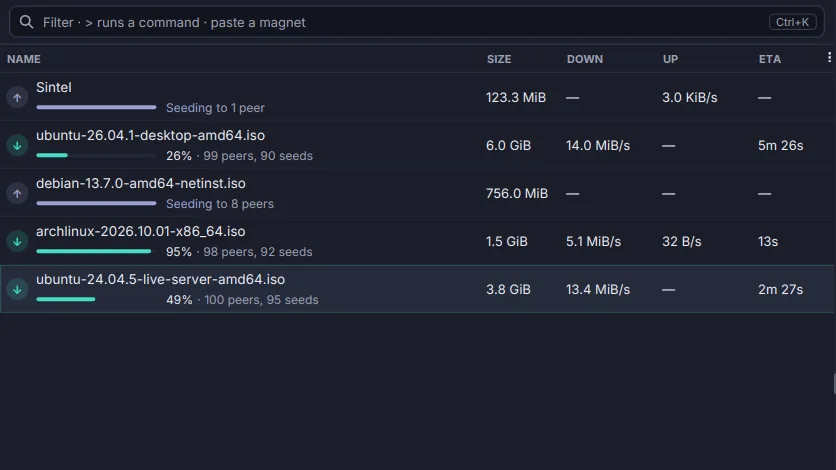
The omnibox
One box above the list (Ctrl+K) that filters by name or by state:seeding, size>4g, added<7d; runs a command after >; and adds a magnet you paste into it.
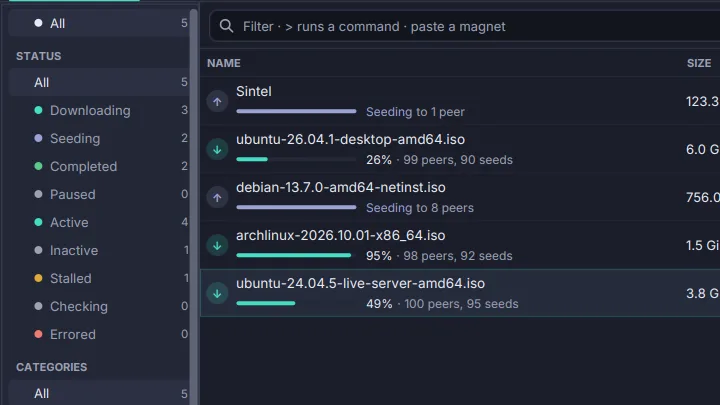
Sidebar filters
Status, category, tag and tracker sections with a count on every entry, walked with the arrow keys. One choice per section, and the list shows what passes all of them.
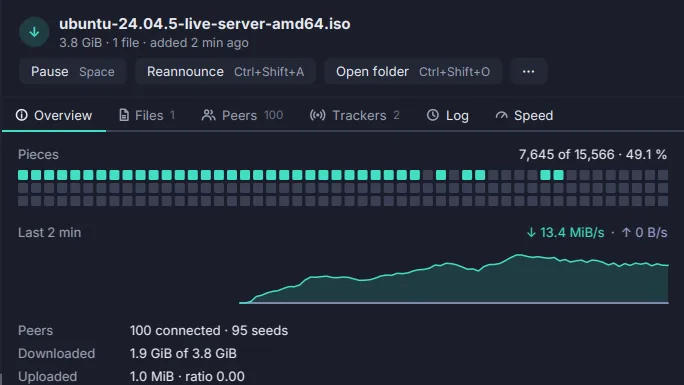
Details pane
Why a torrent is not moving, said in words with a remedy, above its pieces, its speed and its facts. Then Files, Peers, Trackers, Log and Speed.
Themes and languages
Editora Light and Dark, Nord and Cupertino, switched live. English, Deutsch, Español, Français, Italiano and Português, down to the last dialog.
Adding & creating
The Add dialog
Choose files and priorities, the folder with the space it leaves free, a category, tags and how it starts. A magnet's file list fills in while the dialog is open.
Opens from anywhere
The program for .torrent files and magnet: links: a double-click, a browser's link, a drop on the window, or the magnet already on your clipboard.
Create torrents
Hybrid, v1 or v2, an automatic piece size, private, trackers by tier, web seeds and a source tag. Hashed on a worker with a Cancel, and seeded the moment it is made.
Finding torrents
Search
Ask your Prowlarr or Jackett, and sites described by a small definition file, all at once. Results land as each answers, the same torrent shown once, best seeded first.
RSS and auto-download rules
A feed reader with unread counts, and rules in qBittorrent's syntax: must and must-not words, regex, 1x2-5 episode filters and a smart filter that never takes an episode twice.
Watching & managing
Categories and tags
One category per torrent, with its own save path, and any number of tags. Filed from the keyboard, filtered in the sidebar and the omnibox.
Queue, share and speed limits
How many torrents run at once, a ratio or seeding time that pauses or removes, per-torrent caps, and alternative speed limits on a weekly schedule.
Watch folders
Drop a .torrent or a .magnet file into a folder and it is added without a dialog, with that folder's save path, category and start.
Run on event and notifications
A program to run when a torrent is added, finishes or is done seeding, with qBittorrent's %N %F %D placeholders, and a desktop notification for each.
Statistics
This session's and all-time totals, ratio, overhead, wasted bytes, peers, DHT nodes and disk activity, over a speed graph of the last minute, ten minutes, hour or day.
Engine & network
libtorrent inside
The engine behind qBittorrent and Deluge: v2 and hybrid torrents, uTP, DHT, PEX, local discovery, encryption, proxies, and resume data that survives a crash.
A Transmission daemon as the engine
Drive transmission-daemon on a seedbox or a NAS from the same window. What the daemon cannot do is hidden, never greyed out or faked.
IP filter
A blocklist URL refreshed on a schedule (PeerGuardian .p2p, eMule .dat, CIDR), a local list, and peers banned from the Peers tab.
Your desktop
Tray icon and badge
The arrow-in-a-tray mark beside the clock, teal while something downloads, red on an error; close to the tray and keep downloading. The rate on the macOS dock icon.
Settings and sync
A searchable Settings window where every change applies at once, a plain file under it, and the same settings on every computer through a Git repository of yours.
How it compares
Against Transmission 4.1 and qBittorrent 5, the two clients Torrenta set out to replace. The full matrix, row by row, is in the roadmap.
| Feature | Transmission | qBittorrent | Torrenta |
|---|---|---|---|
| A command palette over every action | — | — | ✓ |
| Built-in search across providers, results merged | — | ✓ | ✓ |
| RSS auto-download rules with episode filters | — | ✓ | ✓ |
| Categories with their own save path, and tags | — | ✓ | ✓ |
| Create torrents: v1, v2 or hybrid | ✓ | ✓ | ✓ |
| Watch folders | ✓ | ✓ | ✓ |
| IP filter from a blocklist URL, manual bans | ✓ | ✓ | ✓ |
| Alternative speed limits on a weekly schedule | ✓ | ✓ | ✓ |
| Offers the magnet or link on the clipboard | — | — | ✓ |
| Drive a remote Transmission daemon | ✓ remote GUI | — | ✓ |
| Settings synced between machines through Git | — | — | ✓ |
| A web UI of its own | ✓ | ✓ | later |
Every action has a key
Chords are declared once, on the command, so the menus, the context menu, the toolbar and the palette can never disagree. A few to start with:
- Command Palette Alt+X
- Filter, Run a Command or Add (Omnibox) Ctrl+K
- Add Magnet Link… Ctrl+M
- Add from Clipboard Ctrl+V
- Pause / Resume Space
- New Torrent… Ctrl+N
- Search… Ctrl+Shift+F
- RSS Feeds… Ctrl+R
- Limits… Ctrl+L
- Set Category… Ctrl+Shift+G
- Copy Magnet Link Ctrl+Shift+C
- Settings… Ctrl+,
Download
Native installers for macOS, Windows and Linux are attached to each release. Each bundles its own Java runtime and the engine; there is nothing else to install.
libtorrent's native library exists for these three platforms only, so Intel Macs and ARM Linux have no build yet.
Installers are currently unsigned. On macOS the first launch is blocked: open System Settings → Privacy & Security and click Open Anyway. On Windows, if SmartScreen appears, choose More info → Run anyway. Each release lists SHA-256 checksums.
Build & run from source
Requires JDK 25 (the build refuses another and says so). A Maven wrapper is bundled, so no local Maven install is needed.
# Clone
git clone https://github.com/adriandeleon/torrenta.git
cd torrenta

# Run the app
./mvnw javafx:run

# Tests, coverage floor and the formatter check
./mvnw verify

# A self-contained app image (add -Dskip.installers=false for .deb .rpm | .dmg | .msi)
./mvnw clean -Pdist -DskipTests package
Built in the open with the help of AI coding tools. Every change lands as a reviewed, tested commit on GitHub.