
Tabs
Tabs that tile the window, hide when there is only one, and can be dragged, renamed, duplicated and reopened. A dot says when something happened in a tab you are not looking at.
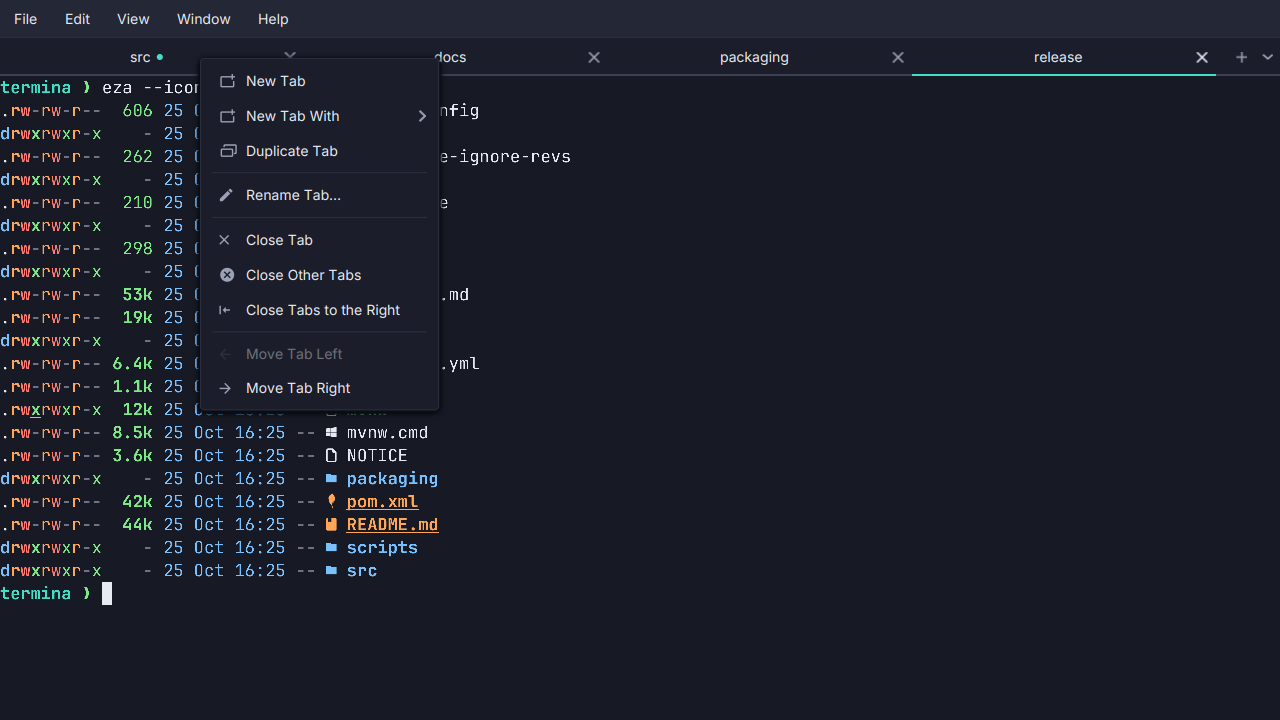
- A strip that stays out of the way. It hides while one tab is open, giving the row to the shell, and tiles the window’s width once there are more.
- Keys for all of it.
Ctrl+Shift+Topens andCtrl+Shift+Wcloses (Cmd+TandCmd+Won macOS);Alt+1…Alt+9(Cmd+1…Cmd+9) jump, with9always the last tab;Ctrl+Shift+LeftandRightmove one. - Rename, duplicate, reopen. Double-click a tab to name it. Duplicate Tab opens the same shell where this one is now, beside it. Reopen Closed Tab (
Ctrl+Shift+Z,Cmd+Zon macOS) brings back the last of ten closed tabs, in its directory and its old place. - Activity and bell marks. A background tab shows a dot when output arrives after a quiet spell, such as a build finishing, and another color for a bell.
- Closing asks only when it matters. A tab whose shell is running something, a background job included, names it and asks before ending it. An idle prompt closes at once.
- A menu per tab. Right-click a tab for New Tab With, Duplicate, Rename, Close Others, Close to the Right and Move.
See Tabs and windows.